
Genuine Windows Server CAL License for Secure Server Access

Managing business networks requires more than just deploying a Windows Server. Every user or device connecting to your server must have the appropriate licensing to ensure secure, compliant, and uninterrupted access. This is where a windows server cal becomes essential. Whether your organization operates a small office or a large enterprise, selecting the correct Client Access License helps maintain compliance with Microsoft licensing requirements while providing authorized access to server resources.
A windows server cal licence is designed to grant users or devices permission to connect to services hosted on Windows Server. Without the correct licensing, businesses may face compliance issues, operational limitations, and unexpected costs during software audits. To better understand how Microsoft server environments work, it's also helpful to explore Windows Server Explained Uses Features and Versions, as it provides valuable insights into the platform and its licensing requirements.
This guide explains everything you need to know about a windows server cal, including its purpose, available types, key benefits, and how to choose the right licensing option for your business.
What Is a Windows Server CAL
A windows server cal (Client Access License) is a Microsoft license that authorizes a user or device to access services provided by a Windows Server. Purchasing the server operating system alone does not automatically grant access rights to every employee or workstation within your organization.
A windows server cal licence ensures that users or devices can legally connect to shared resources such as:
- File servers
- Print servers
- Active Directory
- Domain services
- Remote Desktop Services
- Application servers
- Network storage
- Enterprise business applications
Choosing the correct windows server cal licence also protects organizations from unexpected licensing penalties while ensuring employees have uninterrupted access to business critical resources.
Understanding Windows Server CAL Licence Types
Microsoft offers two primary licensing models based on how your organization uses Windows Server.
User CAL
A User CAL licenses an individual person rather than a specific device. One licensed user can access the server from multiple devices including desktops, laptops, tablets, or mobile phones.
This licensing model is ideal for:
- Remote employees
- Hybrid workplaces
- Employees using multiple devices
- Field service teams
- Business executives
- IT administrators
A windows server cal based on the User CAL model provides greater flexibility for organizations where employees frequently switch between devices during the workday.
Device CAL
A Device CAL licenses one physical device regardless of how many people use it.
This model is suitable for:
- Shared office workstations
- Manufacturing facilities
- Retail stores
- Hospitals
- Educational institutions
- Customer service counters
If several employees share the same computer during different shifts, a windows server cal licence using the Device CAL model can significantly reduce licensing costs.
User CAL vs Device CAL
Selecting between User CAL and Device CAL depends entirely on how your organization operates.
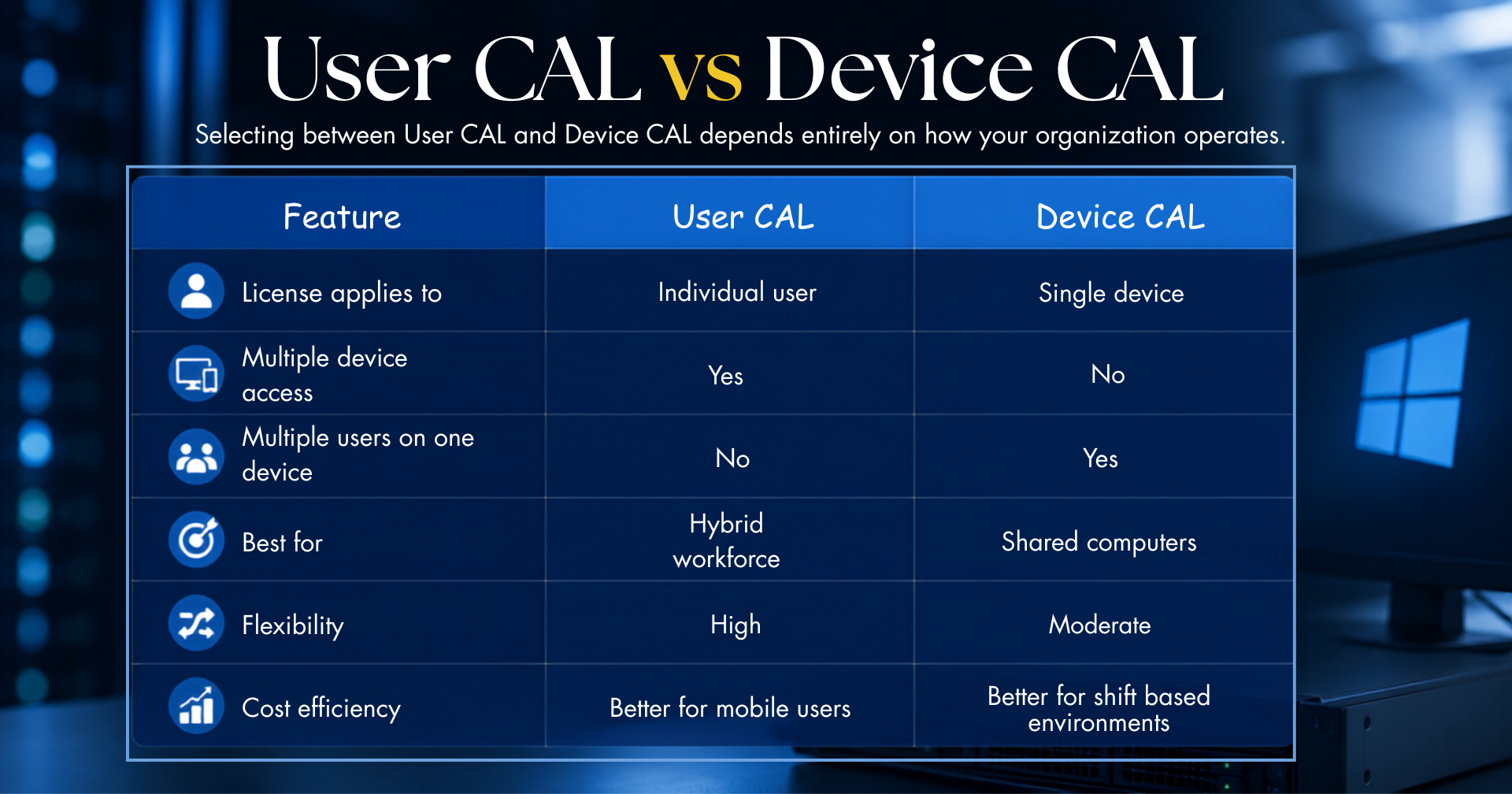
There is no universal choice that fits every business. Organizations should evaluate their workforce, infrastructure, and future expansion plans before selecting the appropriate windows server cal licensing model.
Benefits of Genuine Windows Server CAL License
Choosing a genuine windows server cal provides much more than licensing compliance. It strengthens your IT infrastructure while supporting long term operational efficiency.
1. Improved Security
A genuine windows server cal licence ensures only authorized users and devices can access server resources. This helps organizations maintain stronger security controls and protect sensitive business information.
2. Microsoft Licensing Compliance
Using legitimate Microsoft licenses reduces compliance risks during audits. Businesses can confidently demonstrate that their IT environment follows Microsoft's licensing policies.
3. Reliable Business Operations
Licensed environments minimize service interruptions and ensure users have uninterrupted access to files, applications, authentication services, and shared resources.
4. Simplified IT Management
Proper licensing makes it easier for IT administrators to monitor users, devices, permissions, and server access across the organization.
5. Long Term Cost Efficiency
Purchasing the correct windows server cal licence from the beginning helps organizations avoid unnecessary licensing expenses while optimizing future IT investments.
How Windows Server CAL Supports Business Productivity
A windows server cal is more than a licensing requirement it enables employees and devices to securely access the resources they need to perform daily tasks. Whether your organization relies on centralized file storage, Active Directory, Remote Desktop Services, or business applications, the right licensing ensures seamless connectivity while maintaining compliance with Microsoft's licensing policies.
A genuine windows server cal licence helps organizations build a stable IT environment where users can collaborate efficiently without interruptions. As businesses expand, additional CALs can be added to support new employees or devices, making it easier to scale your infrastructure without replacing existing server deployments.
Key advantages include:
- Secure access to Windows Server resources
- Simplified user and device management
- Better support for hybrid and remote work environments
- Improved operational efficiency
- Easier compliance with Microsoft licensing requirements
- Flexible licensing options for organizations of all sizes
Investing in the appropriate windows server cal helps businesses maintain a reliable and productive network while supporting future growth.
Windows Server CAL Products Available at WinLicense
Windows Server 2025 CAL Solutions
Support your latest Windows Server environment with genuine Microsoft Remote Desktop Services CALs designed for secure and compliant access. The Windows Server 2025 RDS 1 Device CAL is an ideal solution for organizations that require licensed Remote Desktop Services access for shared devices while ensuring Microsoft licensing compliance and reliable server connectivity.
Windows Server 2025 Remote Desktop Services 1 Device CAL
- License Type: Device CAL
- Price: ₹15,989 / Yearly
Windows Server 2025 Remote Desktop Services 1 User CAL
- License Type: User CAL
- Price: ₹949 / Yearly
Windows Server 2022 CAL Solutions
Windows Server 2022 CALs provide flexible licensing options for businesses that require secure remote access and reliable server connectivity.
Windows Server 2022 Remote Desktop Services 1 Device CAL
- License Type: Device CAL
- Price: ₹15,989 / Yearly
Windows Server 2022 Remote Desktop Services 1 User CAL
- License Type: User CAL
- Price: ₹949 / Monthly
Windows Server 2019 CAL Solutions
Keep your Windows Server 2019 environment fully licensed with genuine Microsoft Remote Desktop Services CALs from WinLicense.
Windows Server 2019 Remote Desktop Services 1 Device CAL
- License Type: Device CAL
- Price: ₹15,989 / Yearly
Windows Server 2019 Remote Desktop Services 1 User CAL
- License Type: User CAL
Price: ₹949 / Monthly
Why Choose WinLicense for a Windows Server CAL License
Selecting the right licensing partner is just as important as choosing the right Windows Server CAL License. At WinLicense, a Trusted Microsoft Authorized Reseller, we provide genuine Microsoft licensing solutions backed by expert guidance and dedicated customer support. Whether you're a small business or a large enterprise, our team helps you select the most suitable Windows Server CAL Licence based on your IT infrastructure and business requirements.
When you choose WinLicense, you benefit from:
- 100% Genuine Microsoft Licenses to ensure licensing compliance and secure server access.
- Expert Licensing Consultation to help you choose the right User CAL or Device CAL for your organization.
- Competitive Pricing with cost effective licensing solutions tailored to your business needs.
- Fast License Delivery so you can deploy your Windows Server environment without unnecessary delays.
- Dedicated Customer Support before, during, and after your purchase to assist with licensing queries.
- Licensing for Multiple Windows Server Versions, including Windows Server 2025, Windows Server 2022, and Windows Server 2019.
Whether you're deploying a new Windows Server, expanding your existing network, or upgrading your Microsoft environment, WinLicense is your trusted licensing partner.
Get Genuine Windows Server CAL
Ready to get started? Contact WinLicense today to find the right Windows Server CAL License for your business and simplify your Microsoft licensing with trusted expertise. Visit www.winlicense.in or speak with our licensing specialists for personalized.
Frequently Asked Questions
1. What Is Windows Server CAL?
A Windows Server CAL (Client Access License) is a Microsoft license that allows a user or device to legally access services hosted on a Windows Server. While a Windows Server license covers the server operating system, it does not include access rights for users or devices. A Windows Server CAL is required to access services such as Active Directory, file sharing, printing, and Remote Desktop Services.
There are two types of Windows Server CALs:
- User CAL: Licenses one user to access the server from multiple devices.
- Device CAL: Licenses one device that can be used by multiple users.
Choosing the right CAL helps ensure Microsoft licensing compliance, secure server access, and efficient IT management.
2. How to Check CALs on a Server?
You can check Remote Desktop Services (RDS) CALs using the Remote Desktop Licensing Manager on your Windows Server.
Steps to check CALs:
- Open Server Manager.
- Go to Tools.
- Select Remote Desktop Licensing Manager.
- Choose your Licensing Server.
- View installed, available, and issued CALs.
Note: Standard Windows Server CALs are not displayed directly on the server. Microsoft recommends maintaining licensing records and purchase documentation to verify your CALs.
3. How to Install CAL on Server?
Installing a Windows Server CAL for Remote Desktop Services requires activating the Licensing Server and installing the purchased licenses.
Steps to install a CAL:
- Install the Remote Desktop Licensing role.
- Open Remote Desktop Licensing Manager.
- Activate the Licensing Server.
- Right-click the Licensing Server and select Install Licenses.
- Enter your Microsoft license details.
- Complete the License Installation Wizard.
- Configure the Remote Desktop Session Host to use the Licensing Server.
Once completed, your server is ready to issue Remote Desktop Services CALs to authorized users or devices.
4. Do I Need CAL for Active Directory?
Yes. If users or devices access Active Directory Domain Services (AD DS) on a Windows Server, they generally require a valid Windows Server CAL.
A CAL is typically required for access to:
- Active Directory authentication
- Domain login
- Group Policy
- Shared folders
- Network printers
- File servers
- Other Windows Server services
Using the correct Windows Server CAL helps your organization remain compliant with Microsoft's licensing requirements.
5. How Many CALs Come with Windows Server?
A Windows Server license does not include any Client Access Licenses (CALs). CALs must be purchased separately based on the number of users or devices accessing the server.
The number of CALs required depends on:
- Total users accessing the server.
- Total devices connecting to the server.
- Whether you choose User CALs or Device CALs.
Purchasing the correct number of CALs ensures every authorized connection is properly licensed.
6. How to Activate Windows Server User CAL?
Standard Windows Server User CALs do not require manual activation. However, Remote Desktop Services (RDS) User CALs are activated through the Remote Desktop Licensing Server.
Steps to activate an RDS User CAL:
- Install the Remote Desktop Licensing role.
- Activate the Licensing Server.
- Install your purchased User CALs.
- Configure the Remote Desktop Session Host.
- Windows Server automatically assigns User CALs when users connect.
Purchasing genuine Windows Server CALs from a trusted Microsoft reseller helps ensure proper licensing, compliance, and uninterrupted server access.
Copyright ©2026 Microsoft. All Rights Reserved