
Why Microsoft SQL Server Is the Best Database Solution for Businesses
In today's digital landscape, data is one of the most valuable assets for any organization. Businesses rely on databases to manage customer information, financial records, inventory, applications, and business intelligence. Choosing the right database platform is essential for ensuring performance, security, scalability, and long-term growth. Microsoft SQL Server has consistently remained one of the world's leading relational database management systems (RDBMS), trusted by enterprises, government organizations, healthcare providers, financial institutions, and growing businesses.
Whether you run a small business or a large enterprise, Microsoft SQL Server offers a secure and reliable platform for managing mission-critical data. With powerful analytics, built in security, cloud integration, and high availability features, it helps organizations improve operational efficiency while supporting future growth.
What Is Microsoft SQL Server?
Microsoft SQL Server is a relational database management system (RDBMS) developed by Microsoft. It is designed to store, organize, retrieve, and manage structured data efficiently. Businesses use SQL Server to power websites, enterprise applications, ERP systems, CRM platforms, banking software, healthcare solutions, and eCommerce applications.
The platform supports SQL (Structured Query Language), enabling developers and database administrators to create, modify, and manage databases with precision. Its ability to process large volumes of data while maintaining excellent performance makes it one of the preferred database solutions worldwide.
Key Features of Microsoft SQL Server
Businesses choose Microsoft SQL Server because it offers enterprise-grade capabilities that support modern applications and growing workloads. Purchasing through a Microsoft Authorized Reseller India ensures genuine licensing, expert guidance, and reliable support for your database infrastructure.
Security is a major strength of SQL Server. It includes:
- • Transparent Data Encryption (TDE)
- • Always Encrypted
- • Row Level Security
- • Dynamic Data Masking
- • Multi-factor authentication support
- • Role-based access control
These features help organizations protect sensitive business information and comply with regulatory requirements.
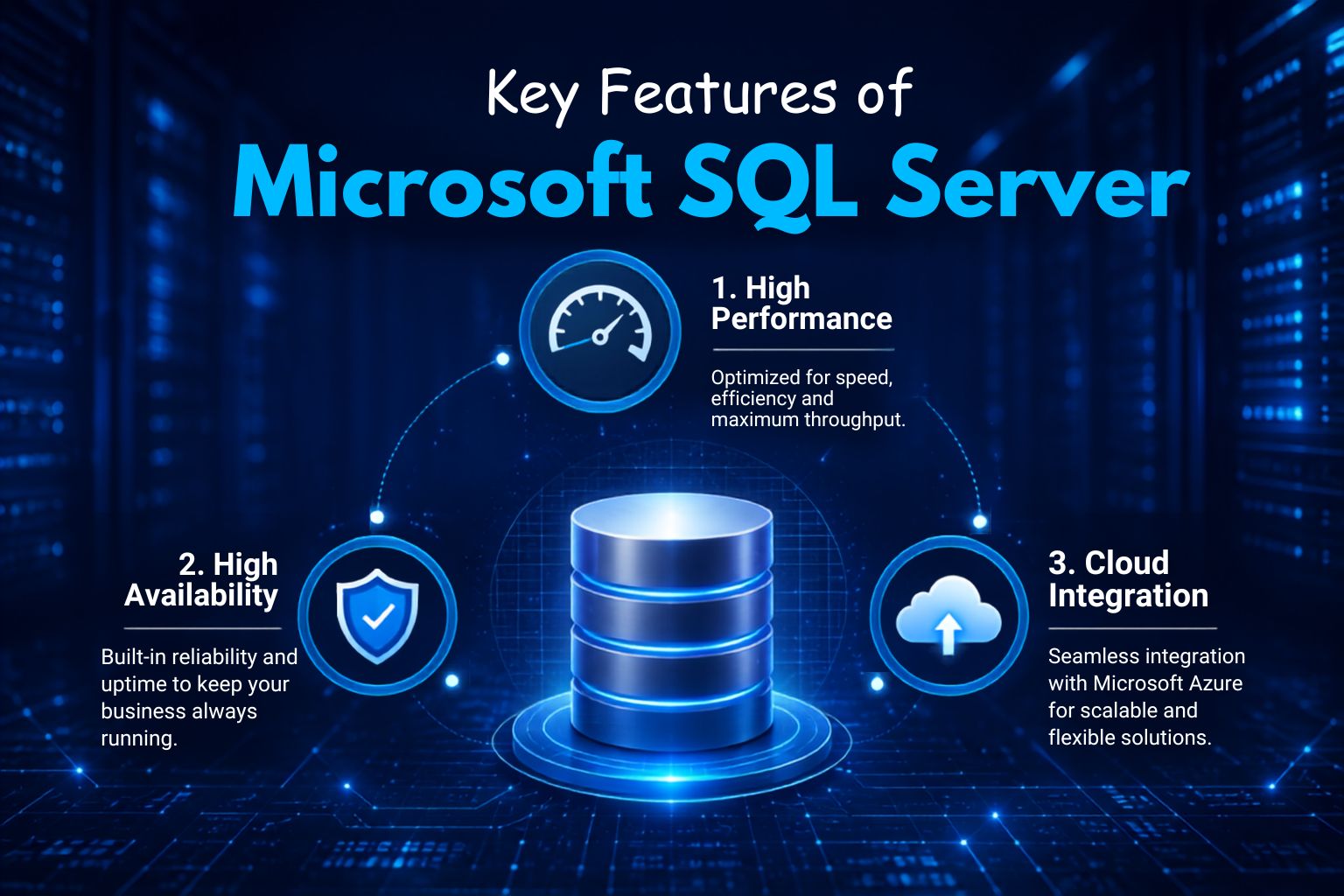
1. High Performance
SQL Server is built for speed and reliability. Features such as Intelligent Query Processing, In-Memory OLTP, optimized indexing, and automatic performance tuning improve database efficiency while reducing response times.
2. High Availability
Organizations require continuous access to business data. SQL Server provides Always On Availability Groups, Failover Cluster Instances, automated backup options, and disaster recovery capabilities to minimize downtime.
3. Cloud Integration
Microsoft has integrated SQL Server with Azure, enabling businesses to deploy hybrid or cloud-based environments. Organizations can easily migrate workloads, synchronize databases, and scale resources as business requirements evolve.
Why Businesses Choose Microsoft SQL Server
There are several reasons why organizations continue investing in Microsoft SQL Server as their primary database platform.
1. Excellent Scalability
From startups to multinational corporations, SQL Server can handle increasing amounts of data without compromising performance. Businesses can expand storage, processing power, and user capacity as operations grow.
2. Reliable Performance
Modern businesses depend on applications that operate continuously. SQL Server delivers consistent performance for transactional systems, reporting platforms, and large-scale enterprise applications.
3. Easy Administration
SQL Server Management Studio (SSMS) provides an intuitive interface for database management. Administrators can monitor server performance, schedule backups, optimize queries, and manage security from a centralized console.
4. Business Intelligence Support
SQL Server integrates with Microsoft reporting and analytics technologies, allowing organizations to generate dashboards, reports, and business insights that support better decision making.
Types of Microsoft SQL Server Editions
Choosing the right edition depends on your workload size, number of users, and compliance needs. Here are the current genuine licensing options available through WinLicense.in, an authorized Microsoft reseller
1. SQL Server 2022 Standard
Best suited for small to mid sized businesses running departmental applications, reporting, and moderate transaction loads. ₹14,449 / Monthly
2. SQL Server 2019 Standard
The sql server 2019 license is a stable and proven server Microsoft SQL edition trusted by organizations that haven't yet upgraded to the latest version. It delivers dependable database performance and is available for ₹17,899, now at a discounted price of ₹14,449 per month.
3. SQL Server 2022 Enterprise
Built for large scale, mission critical workloads that need advanced analytics, unlimited virtualization, and maximum uptime. Ideal for organizations that need to buy sql server 2022 enterprise edition for data warehousing or high-availability clusters. ₹52,449 / Monthly
4. SQL Server 2019 Enterprise
For businesses that want the full Enterprise feature set on a slightly earlier, well-tested release. Many IT teams choose to buy sql server 2019 enterprise edition when their existing infrastructure is already validated against SQL Server 2019. ₹52,449 / Monthly
All licenses come with GST compliant invoices, instant delivery, and audit ready documentation a key reason IT procurement teams prefer a genuine server microsoft sql license over unverified sources.
Common Business Applications
Companies across multiple industries rely on SQL Server for daily operations. Typical use cases include:
- • Customer Relationship Management (CRM)
- • Enterprise Resource Planning (ERP)
- • Banking and Financial Systems
- • Hospital Management Systems
- • Retail Inventory Management
- • Manufacturing Operations
- • Human Resource Management
- • Educational Institutions
- • eCommerce Platforms
- • Business Intelligence Solutions
These applications require secure, accurate, and high-performance databases that SQL Server is designed to deliver.
Best Practices for Database Performance
Maintaining a healthy SQL Server environment requires regular optimization. Businesses should follow these best practices:
- • Schedule routine database maintenance.
- • Monitor CPU, memory, and storage usage.
- • Create appropriate indexes.
- • Update database statistics regularly.
- • Remove unused indexes.
- • Perform frequent backups.
- • Optimize SQL queries.
- • Monitor blocking and deadlocks.
- • Keep SQL Server updated with the latest security patches.
Following these practices helps maintain long-term database stability and performance.
Security Advantages
Protecting business information is a top priority. The server microsoft sql platform provides multiple layers of protection that reduce security risks.
Key security capabilities include:
- • Encryption for data at rest and in transit
- • User authentication and authorization
- • SQL Audit
- • Data classification
- • Backup encryption
- • Threat detection
- • Secure database permissions
These features help organizations defend against unauthorized access and data breaches.
Backup and Disaster Recovery
Unexpected hardware failures, cyberattacks, or accidental deletions can interrupt business operations. SQL Server includes comprehensive backup and recovery options such as:
- • Full database backups
- • Differential backups
- • Transaction log backups
- • Point in time recovery
- • Automated backup scheduling
- • Disaster recovery planning
Businesses using server microsoft sql environments can restore databases quickly and minimize operational disruptions.
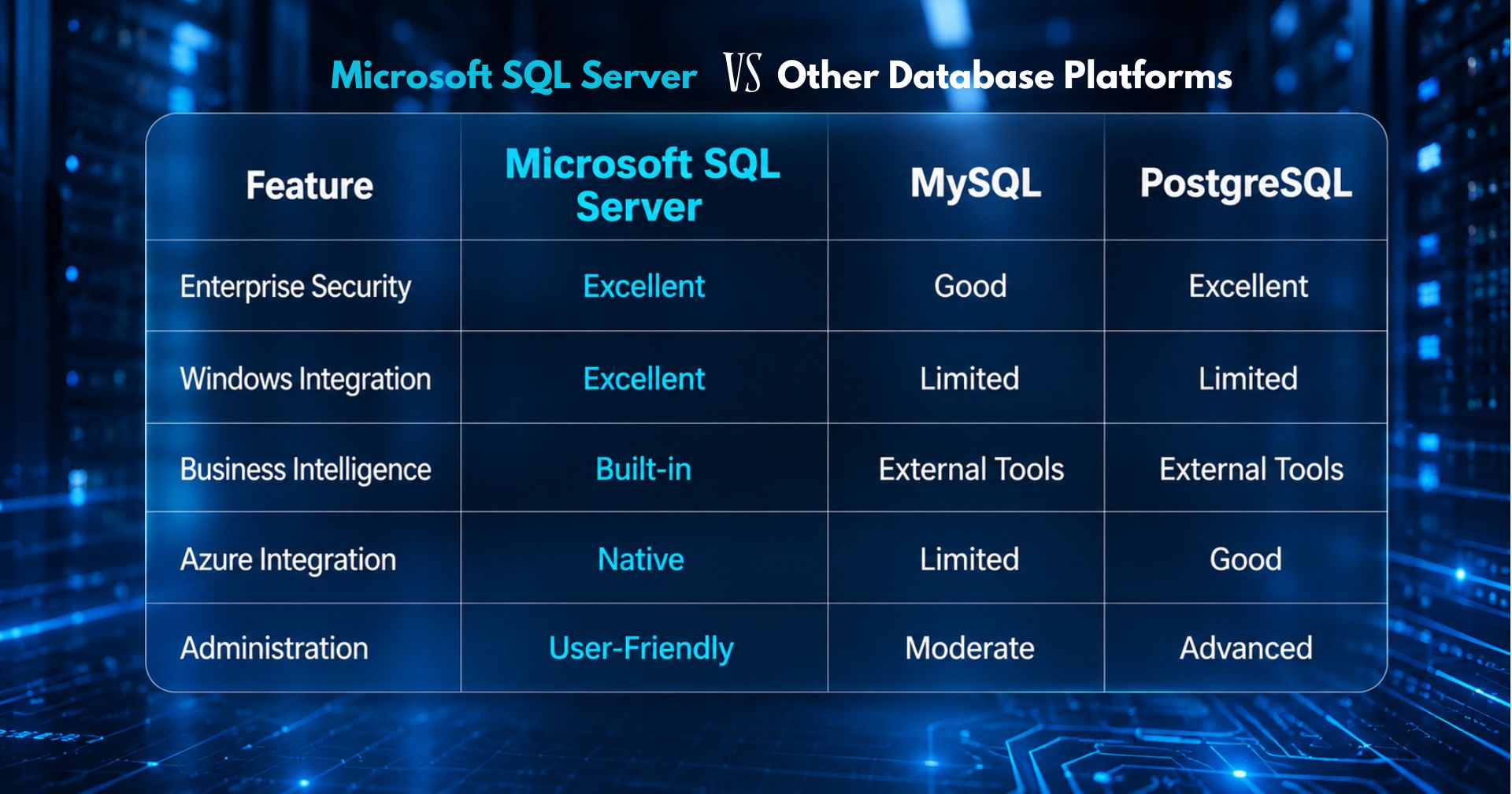
Microsoft SQL Server vs Other Database Platforms
When compared with other database systems, SQL Server offers several advantages.
| Feature | Microsoft SQL Server | MySQL | PostgreSQL |
| Enterprise Security | Excellent | Good | Excellent |
| Windows Integration | Excellent | Limited | Limited |
| Business Intelligence | Built-in | External Tools | External Tools |
| Azure Integration | Native | Limited | Good |
| Administration | User-Friendly | Moderate | Advanced |
For organizations already using Microsoft technologies such as Windows Server, Active Directory, Azure, and Power BI, SQL Server provides seamless integration.
Cloud and Hybrid Deployment
Modern organizations increasingly adopt hybrid infrastructure to improve flexibility, scalability, and business continuity. Server microsoft sql environments integrate seamlessly with Microsoft Azure, enabling businesses to combine on-premises databases with cloud services for greater operational efficiency.
- • Extend databases to the cloud
- • Perform secure cloud backups
- • Enable disaster recovery
- • Scale storage on demand
- • Improve application availability
- • Support remote access and distributed workloads
- • Reduce infrastructure costs with flexible cloud resources
Hybrid deployment allows organizations to modernize their IT environment while protecting existing investments. It provides the flexibility to scale resources, enhance data protection, and maintain high availability without replacing their current infrastructure.
Maintenance and Monitoring
Regular database monitoring and preventive maintenance are essential for ensuring the long-term reliability, security, and performance of Microsoft SQL Server. A well-maintained database minimizes unexpected downtime, improves query performance, and helps organizations maintain business continuity.
Database administrators should:
- • Review SQL Server logs to identify errors and performance issues.
- • Monitor disk utilization and storage capacity.
- • Analyze slow-running queries and optimize execution plans.
- • Verify backup integrity and perform regular restore tests.
- • Rebuild or reorganize indexes to maintain optimal performance.
- • Test disaster recovery procedures to ensure business readiness.
- • Monitor security events, user access, and failed login attempts.
- • Apply the latest SQL Server updates and security patches.
- • Track CPU, memory, and database resource usage to prevent performance bottlenecks.
A proactive maintenance strategy helps businesses reduce downtime, improve database efficiency, strengthen security, and ensure that their SQL Server environment continues to support critical business operations as workloads grow.
Why Professional SQL Server Services Matter
Implementing Microsoft SQL Server correctly requires technical expertise, careful planning, and ongoing management. Professional SQL Server services help businesses with installation, deployment, migration, security configuration, performance tuning, backup planning, disaster recovery, health monitoring, and regular maintenance to ensure maximum database reliability.
As a trusted Windows License provider, we help organizations choose the right Microsoft SQL Server edition based on their business requirements and licensing needs. From small businesses to large enterprises, Windows License delivers genuine Microsoft solutions along with expert guidance to simplify deployment and improve database performance. With the support of Windows License, businesses can confidently implement scalable, secure, and high performing SQL Server environments that support mission-critical applications and future growth.
Get Genuine Microsoft SQL Server Solutions from Windows License
Looking for the right Microsoft SQL Server edition for your business? Windows License offers genuine Microsoft SQL Server licenses, expert consultation, deployment assistance, and ongoing support to help you build a secure, high performance database environment. Contact us today to find the best SQL Server solution for your business needs.
Frequently Asked Questions
1. Why is my Microsoft SQL Server running slowly?
Slow performance is usually caused by inefficient queries, missing indexes, or limited server resources. Performance tuning can resolve most issues.
2. Which SQL Server edition should I choose?
SQL Server Standard suits most businesses, while Enterprise is ideal for advanced security, high availability, and large workloads.
3. How can I prevent SQL Server data loss?
Schedule regular backups, test restores, and implement a disaster recovery plan.
4. Can I migrate my existing database to Microsoft SQL Server?
Yes. With proper planning and professional support, databases can be migrated with minimal downtime.
5. Is Microsoft SQL Server secure?
Yes. It offers encryption, access controls, auditing, and advanced security features to protect business data.
6. Why buy Microsoft SQL Server from Windows License?
Windows License provides genuine Microsoft SQL Server licenses, expert guidance, and reliable customer support.
Copyright ©2026 Microsoft. All Rights Reserved