
SQL Server License Types | Standard vs Enterprise
Choosing the right SQL Server edition is an important decision for businesses that rely on databases to run applications, manage customer information, process financial data, support reporting, or power analytics. The appropriate edition depends on factors such as workload size, database performance requirements, user access, server infrastructure, availability needs, security requirements, and future growth.
Microsoft SQL Server provides different editions to support organizations with varying technical and business requirements. For SQL Server 2022, Standard and Enterprise are two key commercial editions. SQL Server 2022 Standard is designed for general business applications, departmental workloads, and organizations that need essential database capabilities with controlled infrastructure and licensing costs. Enterprise is intended for more demanding environments where organizations require greater scalability, advanced performance capabilities, and features designed for mission critical workloads.
What Is a SQL Server License?
A SQL Server license is the legal authorization that allows an organization to run Microsoft SQL Server in a production environment under the applicable Microsoft licensing terms. The license is separate from the SQL Server software itself: the edition determines the capabilities available, while the licensing model determines how the organization is authorized to use those capabilities.
For SQL Server 2022, Standard and Enterprise are paid editions intended for production use. Standard is positioned by Microsoft as a balance of performance, security, and affordability for general business workloads, while Enterprise provides broader capabilities for high end data center and mission critical workloads.
How Does SQL Server Licensing Work?
SQL Server licensing generally requires businesses to evaluate three important factors:
SQL Server edition: Standard or Enterprise, depending on the features and workload requirements.
Licensing model: Depending on the applicable agreement and edition, licensing may involve Per Core or Server + CAL approaches.
Deployment environment: Physical servers, virtual machines, and cloud deployments can have different licensing considerations.
For example, a business running a database application on a server with a defined number of processor cores may evaluate core based licensing. An organization with a controlled number of users or devices may also need to evaluate whether a Server + CAL model is applicable to its specific SQL Server version and licensing agreement. Microsoft notes that licensing rules can vary by licensing program and that some licensing options are subject to agreement specific conditions.
SQL Server Standard vs Enterprise: What Is the Difference?
The choice between Standard and Enterprise should be based on actual business and technical requirements rather than price alone. Standard can be a practical choice for organizations running conventional business applications and moderate database workloads. Enterprise is better suited to environments where database availability, scalability, workload management, and advanced capabilities are critical to business operations.
Businesses should evaluate factors such as:
Number of processor cores and server configuration
Database size and transaction volume
Number of concurrent users and applications
Performance and resource requirements
High availability and disaster recovery requirements
Virtualization and cloud deployment
Required security and database management features
Expected business and database growth
At WinLicense, we help businesses evaluate Microsoft SQL Server licensing options based on their infrastructure and software requirements. Whether you are considering SQL Server 2022 Standard for a business application or SQL Server 2022 Enterprise for a mission critical database environment, understanding the edition and applicable licensing model can help you make a more informed purchasing decision.
SQL Server 2022 Standard
SQL Server 2022 Standard is a practical choice for businesses that need a capable relational database without the broader feature set and higher licensing cost associated with Enterprise. It is commonly suitable for departmental applications, ERP and CRM databases, business applications, reporting workloads, and other mid-sized environments.
A major advantage is licensing flexibility. SQL Server 2022 Standard can be licensed either Per Core or through Server + CAL. Under the Server + CAL model, businesses license the server and the users or devices that access it. Per Core licensing can be more suitable when users are difficult to count, applications are externally accessible, or the workload needs a core based model.
Key reasons to choose Standard
Suitable for many mid-sized business applications
Supports core database, reporting, and analytics workloads
Available through Per Core and Server + CAL licensing
Can provide a lower cost path than Enterprise for moderate workloads
Can be upgraded when business requirements become more demanding
When evaluating licensing cost, do not compare only the purchase price. Consider the number of users, server cores, CAL requirements, virtualization, support, and future expansion. Microsoft’s published SQL Server 2022 pricing lists separate prices for Standard Per Core, Standard Server, and CAL licensing, but actual reseller pricing can vary by licensing program and region.
SQL Server 2022 Enterprise
SQL Server 2022 Enterprise is designed for organizations where database performance, scalability, security, and availability are business critical. It is generally considered when downtime can directly affect revenue, customer service, operations, or compliance.
Enterprise uses the Per Core licensing model. This makes it appropriate for large or unpredictable user populations because access does not depend on purchasing individual CALs under the core model. It is particularly relevant for high volume transaction systems, large databases, demanding analytics environments, and applications that require advanced enterprise capabilities.
When Enterprise makes sense
Mission critical databases
High transaction volumes
Large scale analytics and data workloads
Environments with demanding availability requirements
Organizations that need advanced Enterprise features
Workloads expected to grow significantly
The SQL Server license price for Enterprise is substantially higher than Standard, so the additional capabilities should be justified by the workload. Microsoft positions Enterprise for applications requiring mission critical in memory performance, security, and high availability.
For organizations planning a new deployment, it is also worth comparing the cost of the license with the potential cost of downtime. A less expensive edition may not be the best financial decision if its limitations create operational risk.
SQL Server 2019 Standard
SQL Server 2019 Standard remains relevant for organizations that have existing applications built around SQL Server 2019 or need to maintain compatibility with an established environment. It provides the core database capabilities required by many business applications and data marts.
Microsoft offered SQL Server 2019 Standard under both Per Core and Server + CAL licensing. This gives businesses flexibility when selecting a model based on their infrastructure and user access requirements.
Best use cases for SQL Server 2019 Standard
Existing line of business applications
ERP and CRM systems
Departmental databases
Business reporting
Moderate transaction workloads
Organizations maintaining a validated SQL Server 2019 environment
For businesses comparing SQL Server license price across versions, it is important to look beyond the initial license amount. Migration planning, application compatibility, testing, backup design, hardware, and support can all affect the total cost of ownership.
SQL Server 2019 Standard can also be a sensible option when an existing application has been tested and certified for that version. However, businesses should review Microsoft’s current lifecycle and support information before choosing an older version for a new deployment.
SQL Server 2019 Enterprise
SQL Server 2019 Enterprise is intended for organizations running demanding, business critical database workloads. It includes the capabilities available in the Enterprise edition and was designed to provide high levels of scalability, availability, performance, and security.
It is often considered for large transaction processing environments, advanced analytics, data warehousing, and applications where database downtime can have significant consequences.
Why businesses choose SQL Server 2019 Enterprise
Mission critical database workloads
High performance transaction processing
Large data and analytics environments
Advanced availability requirements
Organizations with demanding performance expectations
Existing applications that depend on Enterprise specific capabilities
Microsoft’s SQL Server 2019 licensing information describes Enterprise as the edition for mission critical in memory performance, security, and high availability, while Standard is positioned for mid-tier applications and data marts.
If you are comparing the SQL Server license price of 2019 Enterprise with newer editions, also consider whether the older version fits your long term support and security strategy. A lower initial cost does not necessarily mean a lower overall cost if migration becomes necessary sooner.
SQL Server Standard vs Enterprise: Which One Should You Choose?
The best edition depends on the workload rather than simply the number of employees in a company. A small company running a mission critical application may need Enterprise, while a larger organization may successfully operate many applications on Standard.
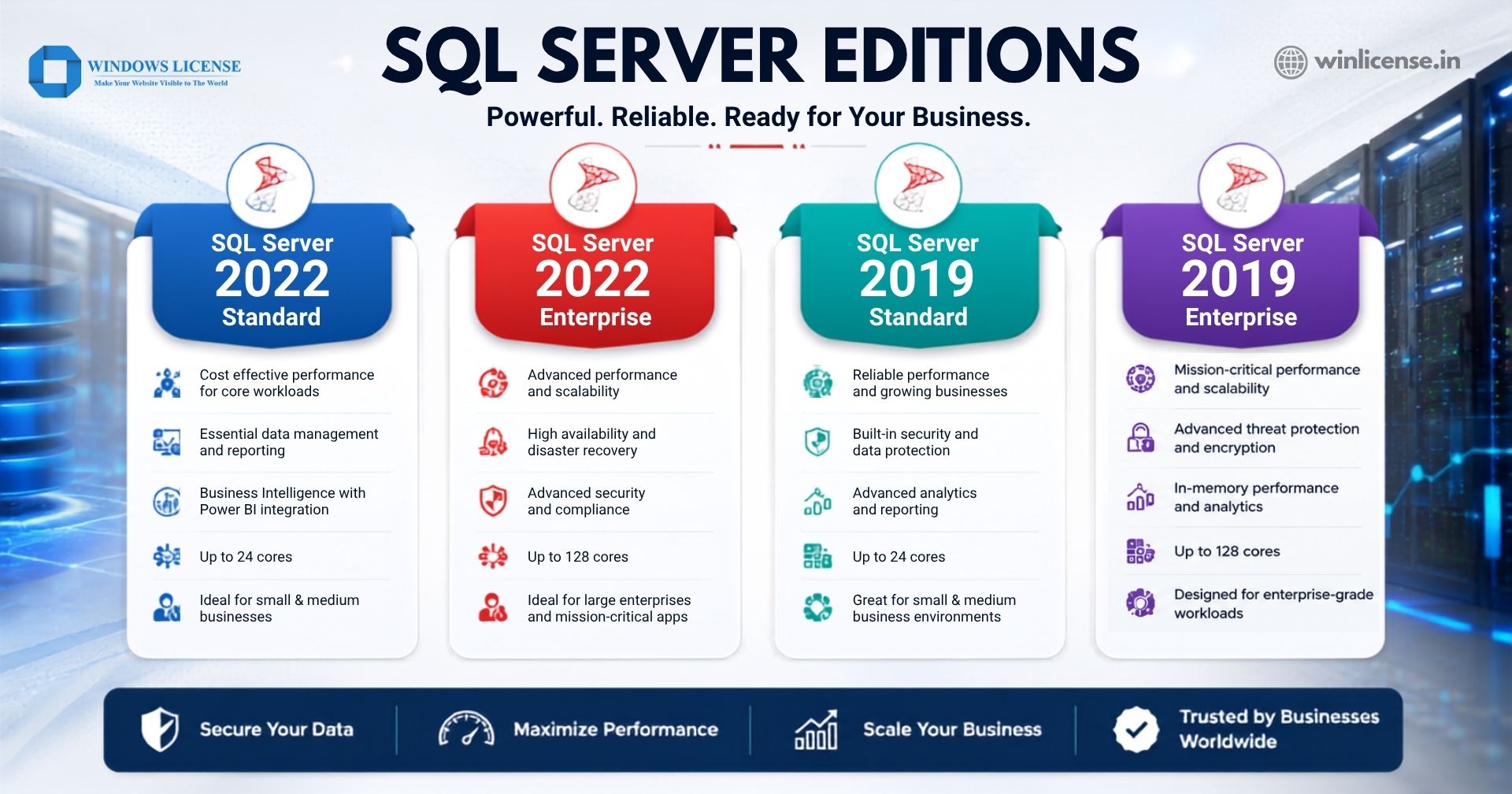
Requirement | Standard | Enterprise |
Typical workload | Mid-tier applications | Mission critical workloads |
Licensing | Per Core or Server + CAL | Per Core |
Cost | Generally lower | Generally higher |
Scalability needs | Moderate | High |
Advanced enterprise capabilities | More limited | Broadest feature set |
Ideal for | Business applications, reporting | Critical databases, large workloads |
Before buying a SQL Server license, assess CPU requirements, memory, database size, concurrent users, virtualization, availability targets, security requirements, and expected growth. This approach helps prevent businesses from paying for capabilities they do not need or selecting an edition that becomes restrictive later.
Choose the Right SQL Server License for Your Business
Selecting the right SQL Server edition and licensing model can help you meet your database requirements while keeping licensing costs under control. Whether you need SQL Server 2022 Standard for everyday business applications or Enterprise for demanding, mission critical workloads, choosing the appropriate license is essential.
Explore SQL Server licensing options with WinLicense and find the right solution for your business requirements. Contact our licensing experts today for product details, pricing, and guidance.
Frequently Asked Questions
1. Is SQL Server Free or Paid?
SQL Server is available in both free and paid editions. Microsoft offers SQL Server Express and Developer Edition at no cost, subject to their respective licensing terms. Commercial editions such as SQL Server Standard and Enterprise require a paid license for production use. The final cost depends on the edition, licensing model, version, and deployment requirements.
2. How much does a SQL Server license cost?
The cost of a SQL Server license depends on the edition and version. On WinLicense, SQL Server 2022 Standard and SQL Server 2019 Standard are priced at ₹14,449 per month, while SQL Server 2022 Enterprise and SQL Server 2019 Enterprise are priced at ₹52,449 per month. Prices may vary based on the licensing option and current offers. View SQL Server licenses on WinLicense
3. How is SQL Server Standard Edition licensed?
SQL Server Standard Edition is licensed primarily under two models: Per Core and Server + CAL. Under the Per Core model, licenses are assigned based on the processor cores running SQL Server. Under Server + CAL, you license the SQL Server instance and purchase a CAL for each user or device accessing it. The best option depends on your users, devices, and server environment.
4. What Is a SQL Server License?
A SQL Server license is a legal authorization from Microsoft that allows an organization to install, run, and use a specific edition and version of Microsoft SQL Server. Licensing terms vary by edition and can be based on processor cores or Server + CALs, depending on the SQL Server version and licensing program. A valid license helps ensure compliant use of SQL Server in business environments.
5. Can I Use SQL Server for Free?
Yes, you can use SQL Server for free, but only with specific editions and within their licensing limits. Microsoft offers SQL Server Express and SQL Server Developer at no license cost, but they are intended for different purposes.
SQL Server Express: A free edition designed for small applications, lightweight workloads, and development. It has resource limitations compared with paid editions such as Standard and Enterprise.
SQL Server Developer: A full featured edition that includes the capabilities of SQL Server Enterprise, but it is licensed only for development, testing, learning, and demonstrations. It cannot be used to run production workloads.
SQL Server Evaluation: Provides the features of Enterprise for evaluation purposes for a limited period, after which a paid license is required for continued production use.
For production environments, organizations generally need a properly licensed edition such as SQL Server Standard or Enterprise, unless another applicable licensing right applies. The cost depends on the edition, licensing model, and required deployment.
Therefore, SQL Server is not completely free for unrestricted commercial use. If you need SQL Server for a business production application, check the licensing requirements before deployment to choose the appropriate edition and licensing model.
6. Is SQL Server Free for Commercial Use?
SQL Server is not generally free for commercial production use. SQL Server Express can be used at no license cost, including for certain production workloads, but it has technical resource limitations. SQL Server Developer is free but restricted to development, testing, and demonstration not production use. For larger business workloads, organizations typically choose SQL Server Standard or Enterprise with the appropriate commercial license.
Copyright ©2026 Microsoft. All Rights Reserved